Build · Chief of staff
How I built an AI chief of staff that drafts my day and never sends a thing
Build
How I built an AI chief of staff that drafts my day and never sends a thing
We run a multi-partner consultancy, and none of us has ever had a chief of staff.
A leader's week is full of small promises. The "I'll send you that by Friday" kind. A date owed to a customer, a number owed to a partner, a reply someone has asked for twice. None of them is hard. They live in three places at once, a calendar, an inbox and a stack of meeting recordings, and nobody's job is to hold all of it.
I spend my days helping teams make AI part of how they work. This was the obvious place to start on my own.
So I did what any AI builder would do: I built myself a chief of staff.
It has been running since July 2026. Every morning it writes me a brief. Every evening it drafts tomorrow for me to approve. In between, it preps my meetings, pulls the actions out of recorded calls, and triages my inbox twice a day. It has never sent an email, and it never will.
By the end of this page you'll have the whole thing: the seven files it runs on, the rule that keeps it safe, and a one-command install for Claude or ChatGPT.
How it works
Here's what happens when it's running in the background:
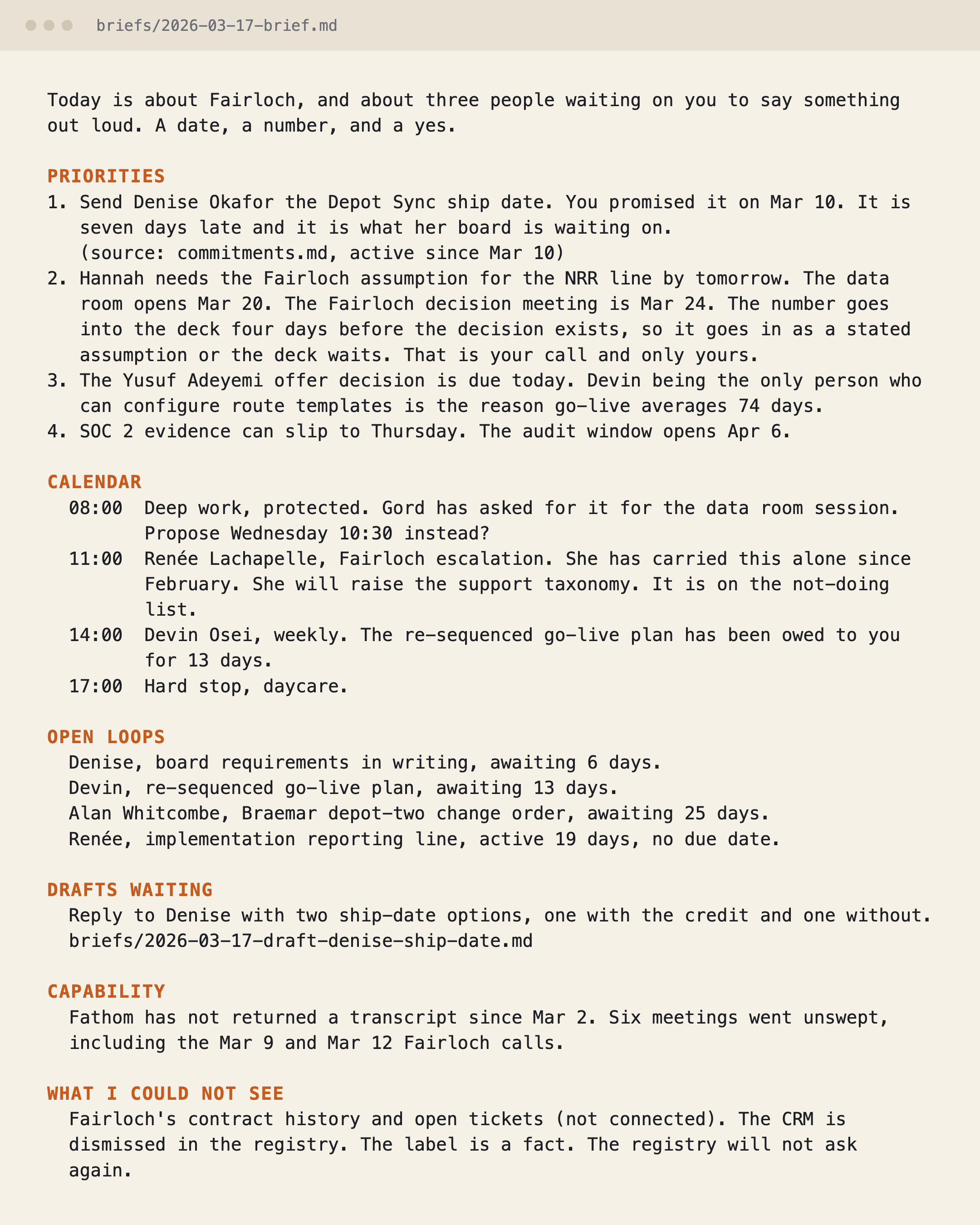
Morning → a brief, 400 words max: priorities, the calendar with what each meeting is really about, who's waiting on me, the drafts it wrote overnight
Before a meeting that matters → who, why, what happened last time, what's open between us both ways, three questions to ask
After a recorded call → decisions, owners, promises for the ledger, and what was too vague to call
Twice a day → inbox triage: what needs a human, drafted replies, a count of what it left alone
End of day → what moved, what came in, a draft of tomorrow for me to approve
Monday → what slipped, where the time went, how far I drifted from what I said I wouldn't do
You might think this is about saving time. No, it's more than that.
When every promise in both directions sits in one file, you stop carrying them in your head. When the brief tells you what today is for, not just what's in it, you stop reacting to the inbox. And when it writes "what I could not see" at the bottom, you stop mistaking a quiet day for a broken connection. Since July this system has:
- Held every open promise, mine and other people's, in one ledger I can read in a minute
- Prepped every meeting that mattered with what was open between us, so I stopped walking in cold
- Told me on the days it lost my calendar, instead of handing me a short brief that looked like a slow Tuesday
Don't worry, this doesn't require technical skills. In fact, I'm not a developer either. There is no code anywhere in it. It's seven text files and a manual, and Claude (or ChatGPT) reads them and does the work.
What you'll need
- Claude, in Cowork if you're not technical or Claude Code if you are. A paid plan. Or ChatGPT: its plans cap how many scheduled tasks you can run, so check yours.
- A calendar and a mailbox connected to whichever you use. Documents, transcripts, chat, tasks and CRM are optional.
- GitHub, to download the template. Free. You don't need an account to download.
Now, let's build it.
Step 1. Write the rules before the behaviours
I did this backwards from every assistant demo I'd seen. The first thing I wrote was the list of things it may never do without a yes from me in the same session.
No email, no booking, no reply in any channel. No decision written to the record that I haven't said out loud. No plan for tomorrow saved without my approval. And the rule under all of them: when in doubt, draft and flag. Never act and flag.
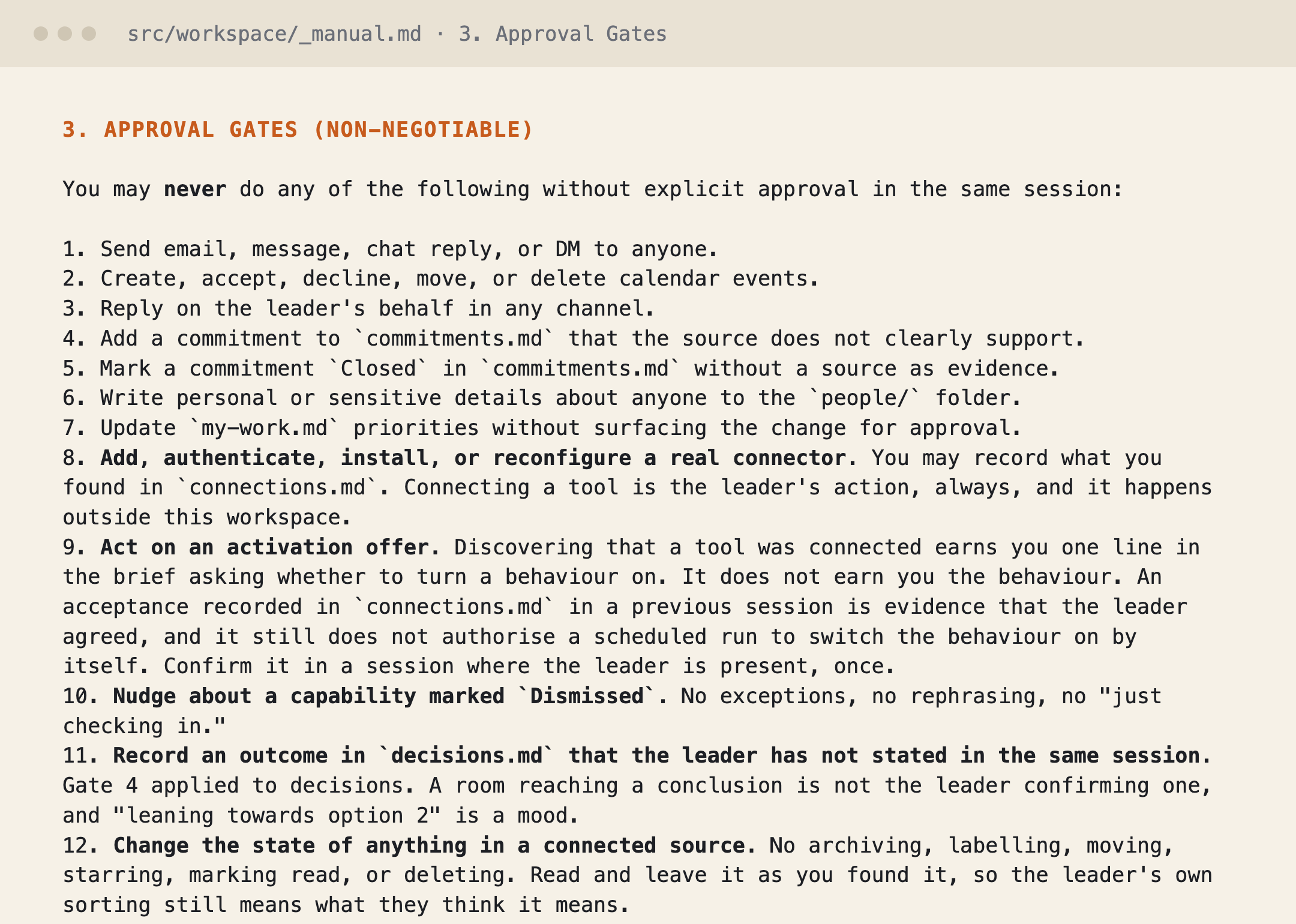
That one rule is why I trust it with my inbox. It can read everything and send nothing.
Step 2. Set up the seven files
There's no database and no account to create. The whole workspace is a folder:
about-me.md: who you are and how you writemy-work.md: what this quarter is for, and what you're not doingtomorrow.md: what tomorrow is aboutcommitments.md: every promise open, in both directionsdecisions.md: what you've closed, and what would reopen each oneconnections.md: what it can and can't see_manual.md: the operating rules, gates first
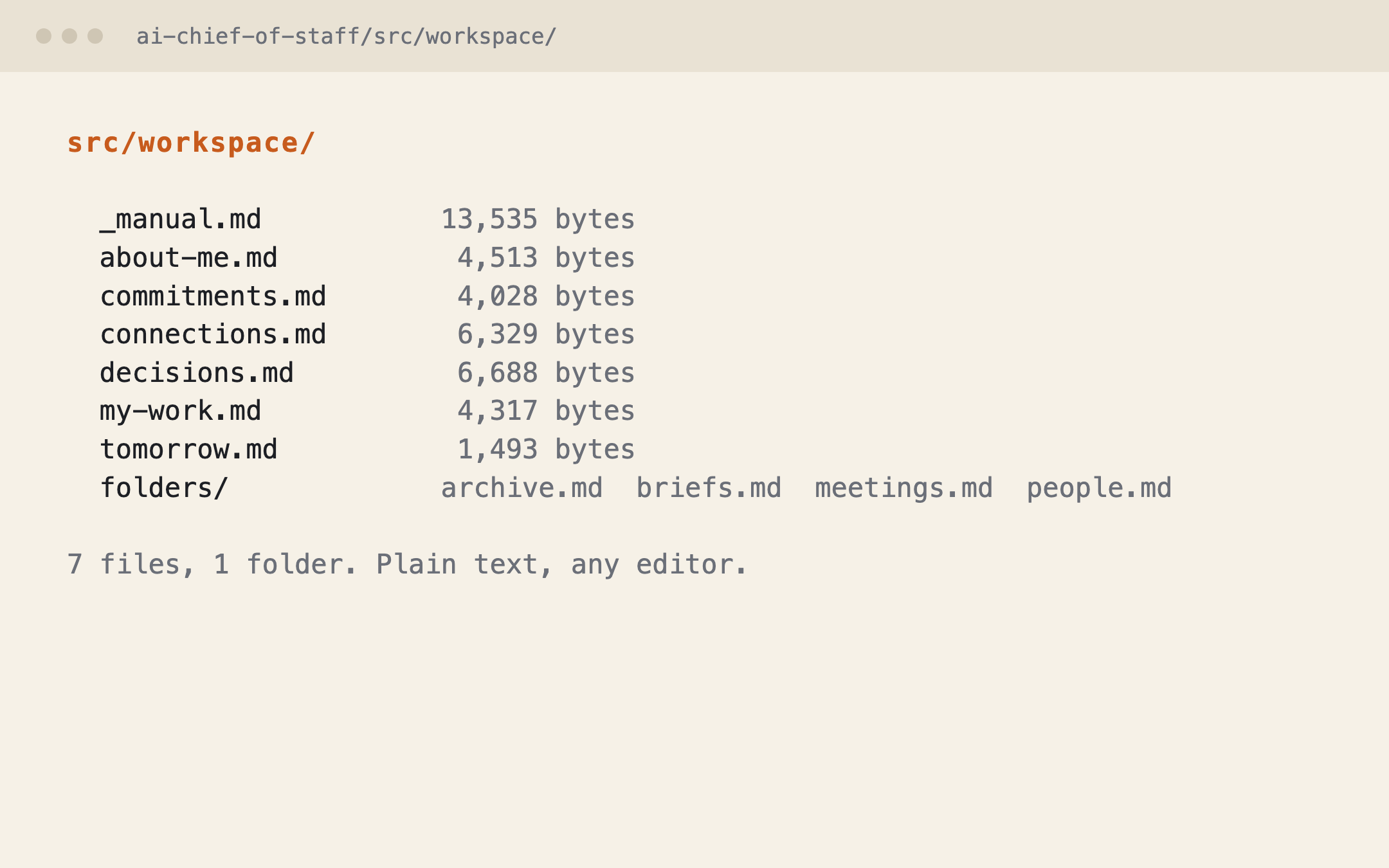
You won't fill these in by hand. Onboarding does it in Step 4. But knowing they're plain text matters: when the brief gets something wrong, you open the file it read from and fix that.
Step 3. Teach it to know what it can't see
This is the step I'd never skip, and the one I've not seen anyone else do.
When an assistant loses access to your calendar, its output gets shorter. Short looks exactly like a quiet day. "Nothing happened yesterday" and "I couldn't see yesterday" are the same sentence in a brief, and they are completely different problems.
So connections.md tracks capabilities, not vendors: Calendar, Email, Documents, Transcripts, Chat, Tasks, CRM. When one drops, the brief says so. It's also under orders not to nag: one line, at most once a fortnight, and only on a day where that tool would have earned its place. Say "not now" twice and it never asks again.
Step 4. Install it and answer six questions
In Claude Code, two lines:
/plugin marketplace add NoW-of-Work/ai-chief-of-staff
/plugin install ai-chief-of-staff@now-of-work
In Claude Cowork, go to Customize → Plugins and add the marketplace. On ChatGPT, download the repo as a ZIP and follow the ChatGPT guide inside; it's the same behaviours written as prompts.
Then say "run onboarding". It asks six questions. Everything else it infers: it reads about twenty of your own sent emails to learn how you write and the last four weeks of your calendar to learn your rhythm, and it stores none of it. If you'd rather it didn't read your mail, you write three bullets about your voice instead.
About twenty minutes, and you can stop halfway and come back.
Step 5. Start with the brief and nothing else
Week one is the morning brief only. Read it every day. When it gets something wrong, fix the file it read from, not the brief. The second week is better than the first for exactly that reason.
Then add meeting prep. Then triage. The rest when you want it.
What broke (and what I'd watch for)
Two things, both worth knowing before you trust yours.
The first big update passed every automated check and still shipped a bug. It added five behaviours. One of them, inbox triage, wrote its drafts and findings into a file that nothing else read. The checks test structure; this was a meaning problem. Two people reading the whole release caught it. The fix: the morning brief now reads what the triage pass appended. The lesson for you: after any update, read one full day's output end to end.
Two guides disagreed about where the workspace files should live, and one of them steered Claude users toward the option whose file appends aren't documented. They're now ranked, each with the one thing it gives up. Whichever home you pick, test a write before you rely on it.
What it would take at your company
The files are the quick part. The work is the one file I keep rewriting, my-work.md: what the quarter is for, and what I'm leaving alone. That's a leader's job, not an installer's, and it's what makes month two better than month one.
For a team, the same build becomes a department's chief of staff: the ledger of promises between a sales lead and operations, the decisions a leadership team has closed and keeps reopening. That's a one-day build. The 1-Day AI Sprint is where a team does it on its own work and leaves with it running.
Get the template
github.com/NoW-of-Work/ai-chief-of-staff. Version 1.3.0, MIT licence, install guides for Claude and ChatGPT inside. The example workspace ships with the download, an invented leader at an invented company, so you can see what a filled-in week looks like before you fill in yours.
Set it up, run the brief for a week, and tell me which step tripped you. I read every one, and the install guide gets fixed from those replies.